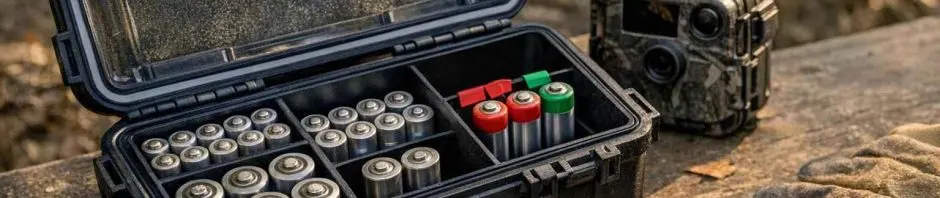
With many trail cameras needing to be powered with A or D cells, simply piling all of your cells into a case without organizing them first can lead to problems with the camera failing to take any pictures (including failing to write any photos to the card). Not only can weak cells cause a camera to fail to take pictures, but storing a camera with weak cells can also cause the camera's housing to leak. By sorting your cells before you store them away, you can make wildlife monitoring much easier to troubleshoot and even help to cut down on waste.
Read the symptoms before changing everything
You change the batteries in your wildlife camera and it no longer takes photos? Check the simplest things first. Is the power switch turned on to the correct position? Is the camera's memory card properly inserted? Are the battery contacts clean and free of any moisture or other substances?
A weak battery does not necessarily shut down the camera. In many cases it will continue to take the odd photo but other functions like the flash, IR emitter, wireless connectivity and low-temperature performance may start to fail. Also, the battery life of a nearly empty battery does not necessarily mean that no wildlife has visited the area recently – simply that the camera has been operating in a marginal state for some time. Have a look at the recent history of the camera's activity, its settings and when it was last serviced.
Build a storage system that shows age at a glance
The simplest useful system is to have 3 separate containers: unused batteries, opened batteries, and batteries that have been removed from a camera. A simple plastic organizer, divided up storage box, or even a labeled resealable pouch would work here as long as the labels can be read and the containers remain dry.
The simplest way to organize opened cells is by the date they were started. Mark that date on the package, and then keep all cells from the same package together in your storage until they are used. For cameras that use many cells, store them in resealable bags and label the bag with the location of the camera or the date the cells were serviced. Just the fact that the cells were opened this month will be sufficient to know to use them for the next deployment.
Cells must be stored with their terminals away from any loose metal such as keys, tools, etc., as well as in dry storage away from excessive heat. Follow storage guidance provided for the cells. Crushed, damp, leaking or visibly damaged cells should be left alone and not returned to service in the trail camera.
Keep old and new batteries out of the same load
Using old and new cells together on the same load will create an unknown power source as the newer cells have more reserve capacity than the older ones, which will run down sooner. Mixing brands and/or types of cells will also create unknowns especially when a camera requires a specific chemistry and/or configuration.
Cells can be sorted into three categories of use: Unused cells are stored in one compartment; opened cells in another. Used cells (which will have had their terminals removed) are stored in a third, clearly labeled compartment. All new cells are installed in the camera as a complete, matched set of (for example) new 4lr44 alkaline batteries of the same type, from the same package, purchased at the same time.
Partially used groups of cells should not be mixed with new ones to form a so-called 'good enough' group for a remote location. First, it could cause problems when the next failure occurs. All used cells should be removed from the camera's compartment and taken back to base for storage, disposal or use in suitable, supervised applications.
Choose alkaline cells with a clear purpose
While alkaline batteries are common, widely available, and can even be recommended for certain cameras, they are by no means the best choice for all purposes or deployment scenarios. Here, different factors can have an impact: temperature, number of images taken, flash settings, or even the wireless functionality of a camera. The relevant settings and recommendations can be found in the operating instructions for your camera, as well as on the packaging of the cells. The cameras should always be powered with the types of batteries recommended by the manufacturer.
As noted above, follow the manufacturer's instructions for battery usage. Although different cells may look similar, some cells are made for specific uses. Mix alkaline with rechargeable cells only if the documentation for the equipment indicates that it is acceptable to do so.
Even brand new cells have a life and will weaken with time. Storing cells for long periods of time in less than ideal conditions is not recommended. Aging cells are best to be stored in their original packaging in a cool, dry place. Inspect cells for signs of swelling, corrosion or any form of leakage before installation. A damaged cell must not be installed to test it. Dispose of aging cells according to local waste disposal policies or the product's disposal guidelines.
Check the compartment before loading the camera
A dirty contact will perform similarly to a weak power source. This could cause problems with your Camera. Also be aware of any corrosion on the circuit board, seals or wires. If you find any of these problems with your Camera then do not attempt to clean them. Follow the camera makers recommended service method for the model.
Don't use abrasives or liquids to clean contacts. Follow the manufacturer's maintenance instructions for your camera for cleaning. Materials such as moisture or residue on the contacts or on the circuit board, seals and wiring can indicate the need for model specific repair.
Ensure that the positive terminal of the new cell is at the same side as the positive terminal marking within the camera's compartment. Switch on the camera and check if it starts up and displays the date, time and all features that were selected. A test shot or checking of the trigger function will rapidly reveal whether a cell has been put in reverse, if connections are loose or if there has been an unexpected reset to factory settings.
Make removal part of every service visit
In tracking how many photos were taken by a camera, it is also useful to note whether the camera was operating at the time of collection (or not), and whether the low power indicator had begun to appear. Also note whether the cells are warm, or if they become damp, corroded or even swell. If a camera is to be left inactive for a lengthy period, remove the cells and record that the cells for that camera have been removed from service.
Recording the details of maintenance done will also be useful for later reference as to why and how wildlife monitoring was affected by a camera failing earlier than expected. In particular, it will be useful to compare a camera that ceases operation early while other cameras with similar settings are still functioning well, particularly in terms of cell age, deployment conditions, etc. of the cells as well as the condition of the compartment of the camera.
Do not store your loose or damaged storage containers with your spare batteries. Also, do not store more spare batteries than you can identify and keep track of. By storing batteries in good organized battery storage, you can ensure that you are not mixing up batteries of different ages in your cameras, making it easier to recognize any symptoms of aging. The best storage for your wildlife cameras is a clean start!